Wait List Management Tactics for Overbooked Medical Practices
Practices lose $150,000 annually per physician to no-shows—a fixable workflow problem.
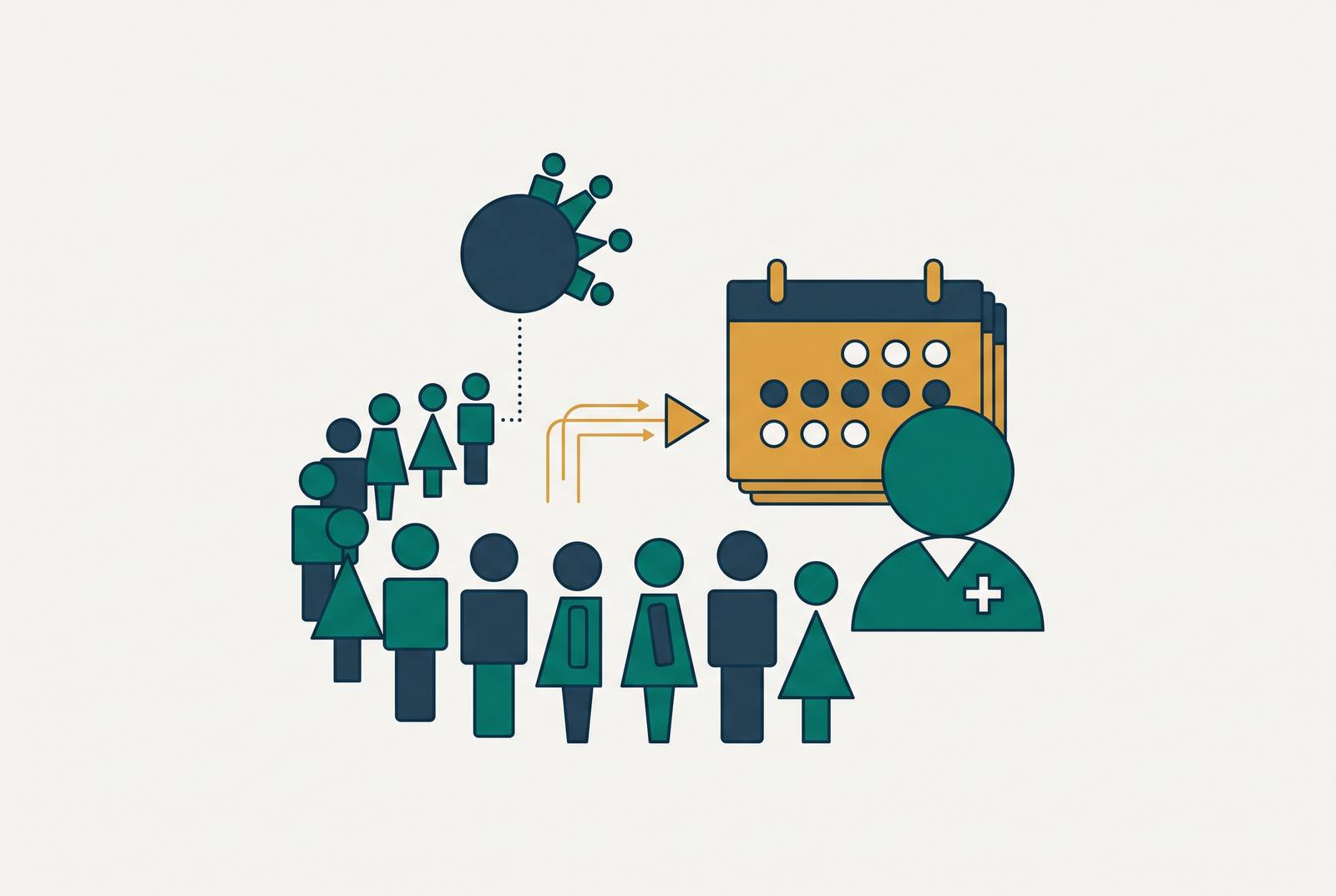
A fully booked schedule and a fully realized one are not the same thing, and the gap between them costs medical practices real money every single day. Demand for care is not the problem. Across major metros, the average new-patient wait is 31 days, up from 26 days in 2022, and the backlog patients face is real and getting worse, not better https://www.mgma.com/mgma-stat/new-patient-wait-times-largely-hold-flat-in-2026-as-some-groups-add-providers-in-bid-to-meet-demand. Yet even as waiting rooms fill and phone lines back up, no-shows and last-minute cancellations quietly eat into that same day's output, consuming roughly 14% of a medical group's revenue and costing something in the neighborhood of $150,000 a year per physician https://www.mgma.com/mgma-stat/patient-access-priorities-for-2026.
No-shows and last-minute cancellations cost a medical practice roughly $150,000 per physician annually and consume about 14% of a medical group's revenue, but the root cause is a workflow failure, not a capacity shortage. The recovery mechanism, the process that catches a cancellation and reassigns it, moves too slowly because most practices run a passive waitlist: sticky notes, a spreadsheet, or a buried EHR column worked by phone whenever someone remembers to. Fixing the problem requires four things operating together: a structured waitlist segmented by urgency rather than arrival order, intake fields that capture real availability windows and preferred communication channel, two-way text outreach that reaches patients during the narrow windows when they can actually respond, and a confirmation step that closes the loop instantly. Practices already running structured outreach can go further by layering in predictive no-show scoring, which flags high-risk appointments days in advance and allows a waitlisted patient to be slotted before the cancellation ever occurs.
Putting those two facts side by side makes the diagnosis write itself. Demand outstrips supply on paper, but a meaningful share of that supply evaporates in practice because the recovery mechanism, the process that's supposed to catch a cancellation and reassign it, moves too slowly to matter. This is a workflow failure, not a capacity shortage, and workflow failures are fixable in ways that hiring another physician is not. It's a workflow failure, and workflow failures are fixable in ways that hiring another physician is not.
What a waitlist is (and why most practices run theirs wrong)
A waitlist, stripped down to its actual function, is the system a practice uses to organize patients who want an earlier slot and match them to openings when someone else cancels or reschedules. Done right, it keeps the schedule full without turning the front desk into a triage unit every time the phone rings. Four things have to be present for a waitlist to work at all: the list of patients with their contact information, availability, and reason for visit; eligibility and preference matching against provider and visit type; an outreach channel to actually reach the patient; and a confirmation step that closes the loop and books the slot.
Most practices are missing at least one of those four pieces, usually the last two. What runs instead is a passive list: sticky notes, a spreadsheet tab, or a column buried in the EHR that someone works by phone whenever they remember to. The trouble with a passive list is that it's slow. It's that it's slow. A receptionist working a paper list spends 20 to 40 minutes per attempt, leaving voicemails and crossing off names one at a time, and because most of those calls happen during business hours, they miss the working patients who'd actually take the appointment. By the time a callback lands, the slot is gone, filled by nobody, and the revenue attached to it is gone too.
Hidden capacity that already exists before adding a single patient to the list
Before a practice adds a single name to a waitlist, it's worth asking whether the schedule is actually as full as it looks. Specialties routinely appear booked solid while real capacity sits locked behind provider-specific holds, template releases that come out too late to be useful, visit types that are hard to book through normal channels, or scheduling rules nobody has revisited in years. None of that capacity appears as an opening because nobody's checked whether the hold still makes sense.
The audit is not complicated. For every hold on a schedule, someone should be able to answer who owns it, when it releases, how often it's actually used, and what happens if it stays open indefinitely. Holds with a documented clinical justification stay. Everything else is a candidate for release back into the bookable pool.
Once that capacity is freed, it still needs somewhere sensible to go. Visit-type stratification determines where it goes. A new patient with an abnormal imaging result, a post-discharge need, or a time-sensitive referral does not belong on the same pathway as a routine consult, and scheduling rules that separate urgent need from routine specialty care, from second opinions, from visits that can start with an APP or a nurse visit, turn newly released capacity into appointments that actually match clinical urgency. This isn't a minor operational detail. An MGMA poll from July 2025 found that 71% of medical groups had fewer than one in four patients using digital tools to schedule, and part of that gap traces directly back to templates so constrained that patients can't find an open slot online even when one technically exists. Online scheduling being "available" means little if the calendar behind it never shows anything open.
Structuring the Waitlist to Do Its Job
Structure is what separates a waitlist that fills slots from a list that just sits there looking organized. The first move is segmenting by urgency, not by arrival order. Time-sensitive patients, post-discharge follow-ups, abnormal results, urgent referrals, need same-day or next-day fill from a dedicated slot pool. Routine specialty patients can safely wait for the next cancellation in standard rotation. Patients flexible enough to see any qualified provider widen the match pool considerably and should be tagged as such.
None of that segmentation matters if intake doesn't capture the right fields to begin with. A workable waitlist entry needs real availability windows, not "anytime," a preferred communication channel, the visit type, insurance information, and how flexible the patient is on provider. If any one of those fields is missing, the matching logic downstream breaks, because the system either can't filter properly or ends up guessing.
Filtering, in fact, matters as much as how deep the list runs. Offering a 15-minute follow-up slot to a patient who needs a full new-patient consult wastes everyone's time, and sending a pediatric provider's opening to an adult patient does the same. Smart filtering prevents that wasted outreach and the double-booking confusion that follows it. Appointment-type hierarchies extend the same logic further: when a procedure slot opens, the patients waitlisted specifically for that procedure should surface first, ahead of whoever happens to be next in a flat, undifferentiated queue.
How fast do you need to reach a patient after a cancellation, and which channel actually works?
Once the list is structured correctly, everything comes down to speed. A patient cancels at 9:47 in the morning for an 11:00 appointment, and the front desk has 73 minutes to fill that chair before the revenue attached to it disappears. The entire value of a waitlist rests on how fast an eligible patient can be reached, and reached in a way that lets them respond before the window closes.
Channel choice decides that speed more than anything else. Text messaging outperforms phone calls because patients actually reply to texts, on lunch breaks, between meetings, late at night, in ways they don't pick up unfamiliar phone numbers. A phone-only workflow misses most of the moments when patients are actually available to respond. Two-way texting paired with a one-tap confirmation link compresses what used to be a multi-step confirm-and-book process down to a matter of seconds. Email still has a place, but only for openings days out, not for anything that needs to fill in the next hour. Phone calls haven't disappeared either, but they're best reserved for the highest-urgency patients or the ones without text capability, rather than treated as the default channel for everyone.
The smarter systems apply this as dynamic logic rather than a blanket rule: live calls and two-way texting go to the highest-risk, highest-urgency situations, while lower-risk openings get handled through automated text, which mirrors the same principle MGMA has identified for no-show outreach generally. Batch size matters too. Notifying a controlled group of eligible patients, rather than blasting the entire waitlist at once, keeps the front office from drowning in simultaneous confirmations and avoids the double-booking mess that comes from too many people claiming the same slot at the same time.
Using predictive no-show data to fill slots before they go empty
Everything described so far reacts to a cancellation after it happens. Predictive models flip that sequence. Instead of waiting for a slot to go empty and then scrambling, these models flag which future appointments are likely to become no-shows based on prior attendance history, appointment type, lead time, and social and economic factors tied to the patient, and pre-load those slots with waitlisted patients before the appointment date even arrives.
Practices don't need to build this capability from scratch. Risk scoring is increasingly embedded directly into practice management and patient communication platforms already on the market. When a model flags a likely no-show days in advance, staff can reach a waitlisted patient with time to spare, rather than working the phones with only 73 minutes on the clock as when a patient cancels at 9:47 AM for an 11:00 AM appointment. That shift, from fire-extinguisher to scheduling layer, is the real value of predictive data: it turns the waitlist from a reactive patch into a planning tool.
The results, where they've been measured, are substantial. An AI-powered no-show prediction model deployed at Emirates Health Services' primary care centers cut no-show rates by 50.7% and reduced patient wait times by 5.7 minutes per visit, while freeing roughly 6,400 staff hours across three months https://www.zocdoc.com/resources/blog/article/how-to-improve-patient-waitlist-management-and-fill-cancellations-faster/. Numbers like that don't happen by accident. They happen because the practice stopped waiting for the problem to occur and started acting on the probability of it occurring instead.
Where automation takes over the work that staff can't do fast enough
There's a ceiling on what a front-desk team can do manually, and it has nothing to do with effort. A staff member can work a waitlist reactively, but no single person can simultaneously monitor the live schedule, filter which waitlisted patients are eligible for a given slot, send outreach across multiple channels, track who's responded, and update the EHR in real time. Speed and consistency at that scale require automation because the task itself exceeds what one person, or even a small team, can track at once.
The automated version of this workflow follows a predictable sequence. A cancellation or reschedule hits the practice management system and flags an open slot, complete with provider, date, time, and visit type. The system checks the waitlist against that opening, filtering for patients who match on provider, visit type, availability window, and active insurance. A batch of eligible patients gets a text or email with the slot details and a one-tap confirmation link. Whoever confirms first claims the slot, the EHR updates immediately, and the slot disappears from the offer pool so nobody else can claim it.
The time saved is not trivial. Manually filling one canceled appointment, including the calls, the voicemails, and the documentation afterward, runs 10 to 15 minutes of staff time. Multiplying that across dozens of weekly cancellations, which is standard for a busy practice, makes the labor cost add up fast. It's no surprise, then, that 55% of healthcare organizations have already fully embedded AI tools into patient scheduling and waitlist management or are in the final stages of doing so https://www.blueprism.com/resources/blog/automation-technology-trends-healthcare/. That's a majority, not an early-adopter minority, and it reflects how directly this problem maps onto a solvable workflow.
What computer-use agents can do beyond scheduling software
Scheduling software, however well built, automates within its own module. Computer-use agents operate differently: they work across the full workflow, moving between the EHR, payer portals, and patient communication platforms the same way a human staff member would, by reading screens, clicking, typing, and navigating from one system to the next. Filling a slot is rarely a single-step scheduling act.
Confirming a waitlisted patient for tomorrow's opening may also require verifying insurance eligibility, checking prior authorization status, updating a referral record, and logging the whole interaction across two or three separate systems. A point tool handles one of those steps well. An agent capable of navigating the entire chain handles all of them, automating a workflow rather than just a task.
Older robotic process automation tools were built around fixed UI selectors, things like XPath, CSS paths, and exact screen coordinates. That approach works fine until a payer updates its portal layout, at which point the script breaks and someone has to track down the failure and fix it before the gap in coverage compounds. In an environment with dozens of payer portals, that's a near-continuous maintenance cycle. It's a near-continuous maintenance cycle. The newer generation of browser-native AI agents sidesteps that fragility by reading the page itself and understanding what's on it, navigating based on intent rather than fixed coordinates, and handling multi-factor authentication, CAPTCHA challenges, and security flow changes as a built-in part of how they operate, which lets them keep working even as payers redesign their interfaces. At enterprise scale, agents built this way achieve roughly 95% uptime, against 60 to 70% for traditional RPA weighed down by constant maintenance https://www.ventus.ai/blog/ai-agents-healthcare-2026-state-enterprise-tools/.
Evaluating waitlist and scheduling automation tools: what matters
Sorting through vendors gets easier once the non-negotiables are clear, and there are five of them. Deep EHR and PMS integration comes first: a waitlist tool has to read and write to the live schedule directly, because a system that manages openings in a separate spreadsheet has just recreated the same manual work in a slightly different interface. Two-way text messaging is second, since phone-only workflows keep missing the exact windows when patients are actually available to respond, and confirmation should take one tap, not a callback that may never get returned.
Smart matching by provider and visit type is the third requirement, filtering logic that keeps a mismatched offer from ever going out and prevents the double-booking chaos that follows when it does. Fourth is HIPAA-grade security: encryption in transit and at rest, role-based access controls, audit trails on every message and confirmation, and a signed Business Associate Agreement with the vendor, requirements that amount to the floor rather than a differentiator. None of that is a differentiator anymore. It is the floor, not a differentiator. Fifth, real-time scheduling sync has to be genuinely real-time: a confirmed slot vanishes from the offer pool the instant it's claimed, not minutes later after some batch update runs.
Beyond those five, the right feature set depends heavily on scale. Multi-location or enterprise operations should be looking for system-agnostic tools that work across every EHR and payer portal already in use, scalable coordination across sites, and automation built at the workflow level rather than as scattered point solutions. Smaller or independent practices are usually better served by templated deployments that go live fast, without demanding a full IT overhaul or custom API work, since automation stops paying for itself the moment implementation drags on longer than the problem it was meant to solve. Whatever the size of the practice, a short list of questions to any vendor cuts through most of the marketing noise: does the tool break when the EHR or a payer portal changes its interface, and what KPIs does the vendor actually track and report back?
Putting the tactics together: a sequenced approach for practices at different starting points
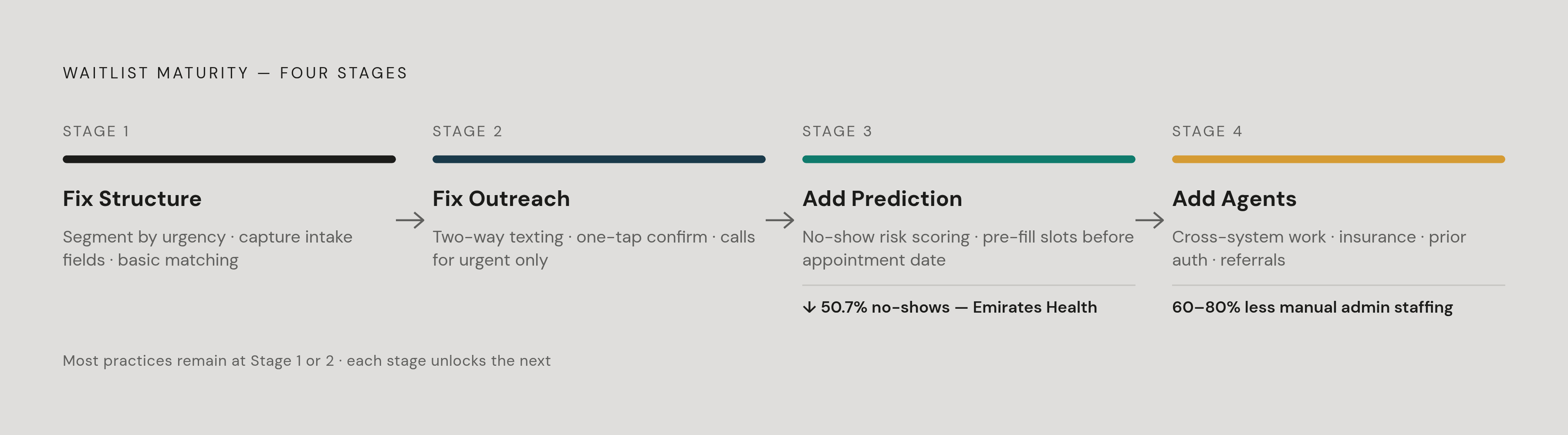
None of this needs to happen all at once, and trying to deploy every tactic simultaneously is usually a mistake. A practice still running a sticky-note waitlist gets the most value, fastest, from fixing structure first: segmenting by urgency, capturing the right intake fields, and building basic matching logic before spending a dollar on automation. Clean data for any automation layered on top later depends on that groundwork.
Practices that already have a structured list but are still filling slots by phone should focus next on channel and speed, moving two-way texting to the front of the outreach sequence and reserving live calls for genuinely urgent cases.
Practices with outreach largely automated but still working reactively are the ones positioned to benefit from predictive no-show data, shifting the whole operation from responding to cancellations to anticipating them days ahead of time. And for larger, multi-location groups already running mature scheduling automation, computer-use agents represent the next layer: handling the cross-system work, insurance verification, prior authorization, referral updates, that scheduling software alone was never built to touch. Enterprise deployments report reductions in manual administrative staffing needs of 60 to 80% and improvements in days-in-accounts-receivable of 15 to 30 days, figures substantial enough to justify the investment on their own https://www.ventus.ai/blog/ai-agents-healthcare-2026-state-enterprise-tools/. Smaller clinics deploying scheduling and rescheduling AI tend to see payback within 60 to 90 days, while reclaiming somewhere between 15 and 25 hours of front-desk time weekly https://bananalabs.io/blog/ai-agents-for-healthcare. Given a global healthcare workforce shortage projected at 10 million workers by 2030, that reclaimed time is capacity a practice cannot get any other way https://www.kore.ai/blog/ai-agents-in-healthcare-12-real-world-use-cases-2026. It's capacity a practice cannot get any other way. Hippocratic AI has partnered with 50 health systems, payers, and pharma clients https://omnimd.com/blog/best-ai-agents-for-medical-practices/.